Most sales teams do not miss the forecast because they lack dashboards. They miss it because stale deals stay in the pipeline long after momentum is gone. Dun & Bradstreet says B2B data can decay by more than 34% per year, and Scratchpad's 2023 RevOps Trends Report found only 22% of RevOps and sales leaders strongly agreed they had the right data for accurate forecasting. (Dun & Bradstreet, Scratchpad)
The fix is not another reporting layer. It is finding stale deals early, prioritizing the ones worth saving, and triggering the next action automatically. This guide shows how to build that flow in Sanka.
Across 15 years of growth work with more than 1,000 companies, from SMBs to global teams, this pattern shows up constantly: stale deals are usually not a motivation problem. They are a prioritization problem caused by weak visibility into who needs follow-up now.
What you'll build
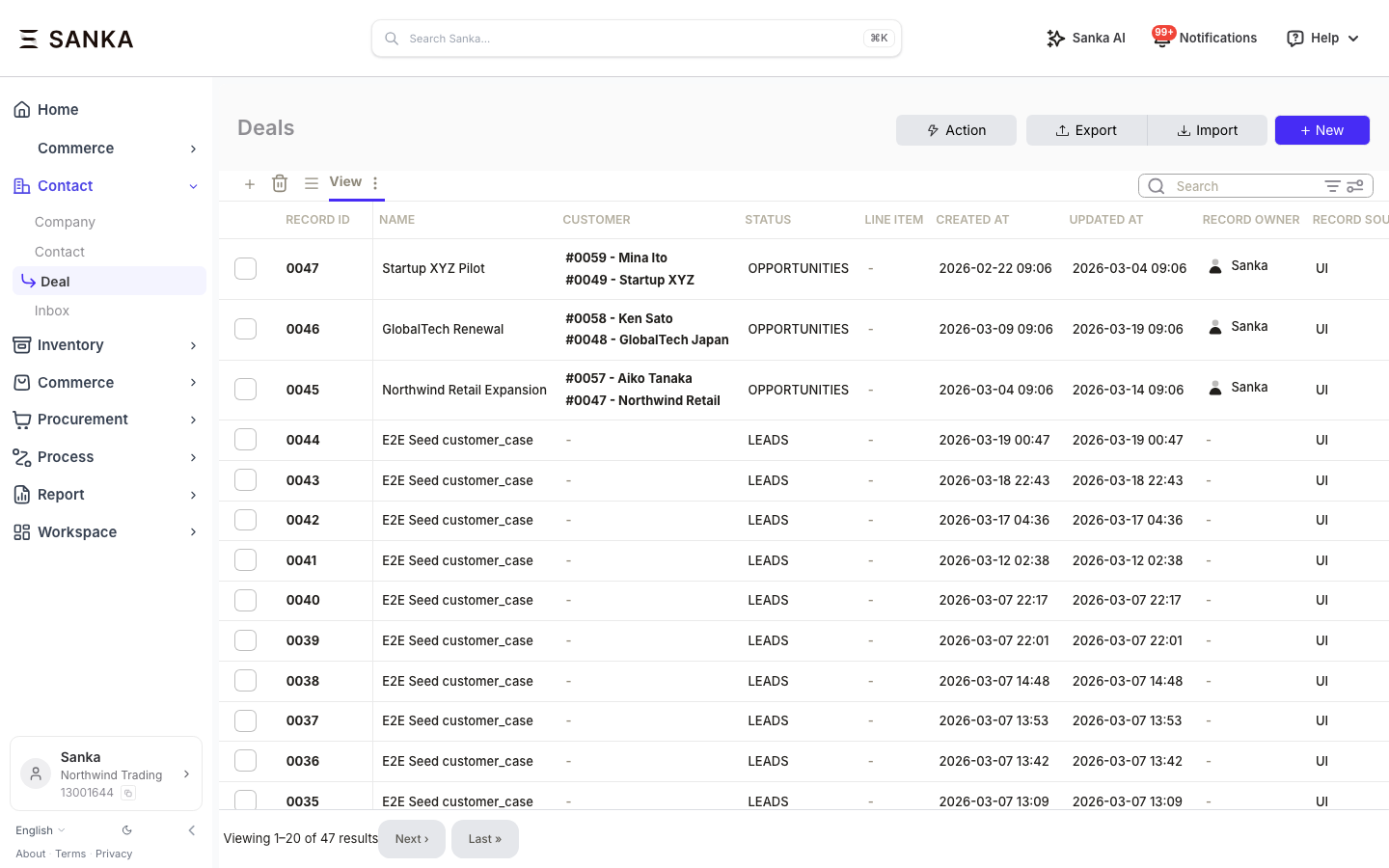
Here's what your deal pipeline looks like before automation — stale deals hiding in plain sight:
An automated system that:
- Scans your deal pipeline for deals with no activity in the last 14 days
- Scores each stale deal to prioritize which ones are worth saving
- Flags high-value stale deals and notifies the owner
- Triggers a re-engagement sequence for recoverable deals
Total setup time: 0 min with ChatGPT/Codex, Claude, or Cursor, 5 min with MCP, 20 min with the SDK.
Option A: Use Sanka from ChatGPT/Codex, Claude, or Cursor (0 min)
No API key, no config, no code. This is the fastest path if you want to work through a connector or plugin.
Here's what it looks like in action:

1. Get connected
For the setup steps in ChatGPT/Codex, Claude, or Cursor, use the getting started guide. This section focuses on the prompt and outcome, not on repeating the same onboarding flow in every article.
2. Ask for the workflow
"List all my open deals that haven't been updated in the last 14 days. For each one, score the deal and tell me which ones are worth re-engaging. For the top 5 by deal value, draft a short follow-up message I can send to the contact."
3. Review the results
Your AI assistant pulls the deal list, checks activity dates, scores each deal, and returns a prioritized table:
| Deal | Value | Days Inactive | Score | Recommended Action |
|---|---|---|---|---|
| Acme Corp — Enterprise Plan | $45,000 | 21 days | 72/100 | Re-engage: send case study |
| GlobalTech — Pro Upgrade | $28,000 | 16 days | 65/100 | Re-engage: offer demo |
| StartupXYZ — Starter | $3,200 | 31 days | 23/100 | Close as lost |
It also drafts follow-up messages for the top deals so the rep can copy, review, and send.
Option B: Build it in your IDE with MCP (5 min)
For developers using Claude Code, Cursor, or other MCP-compatible tools. Same capabilities as the connector but integrated into your development workflow.
1. Connect Sanka MCP
Add this to your MCP config (Claude Code settings.json or Cursor MCP settings):
{
  "mcpServers": {
    "sanka": {
      "url": "https://mcp.sanka.com/mcp?apiKey=sk_live_YOUR_KEY"
    }
  }
}
2. Describe what you want
List all deals where status is "open" and last_updated is older than 14 days.
For each deal, run a deal score. Group results into three buckets:
- "re-engage now" (score >= 60, value >= $10k)
- "nurture" (score >= 40)
- "close as lost" (score < 40 or inactive > 45 days)
For the "re-engage now" bucket, get the primary contact and draft a personalized follow-up.
Update each deal's tags with the bucket label.
3. Review the results
The agent lists deals, scores them via ai.score, updates deal tags, and generates a follow-up report — all within your IDE.
Option C: Build it with the SDK (20 min)
Full control, production-ready code. Version-controlled and CI/CD-friendly.
1. Install the SDK
pip install sanka-sdk
2. Build it
from sanka import Sanka
from datetime import datetime, timedelta

client = Sanka(api_key="sk_live_...")

# 1. Get all open deals
deals = client.deals.list(status="open")

# 2. Find stale ones (no update in 14+ days)
cutoff = datetime.now() - timedelta(days=14)
stale_deals = [
    d for d in deals
    if datetime.fromisoformat(d["updated_at"]) < cutoff
]

print(f"Found {len(stale_deals)} stale deals out of {len(deals)} open deals")

# 3. Score each stale deal
scored = []
for deal in stale_deals:
    result = client.ai.score({"type": "deal", "deal_id": deal["id"]})
    scored.append({
        "deal": deal,
        "score": result["score"],
        "days_inactive": (datetime.now() - datetime.fromisoformat(deal["updated_at"])).days
    })

# 4. Bucket them
reengage = [s for s in scored if s["score"] >= 60 and s["deal"]["value"] >= 10000]
nurture = [s for s in scored if s["score"] >= 40 and s not in reengage]
close_lost = [s for s in scored if s["score"] < 40 or s["days_inactive"] > 45]

# 5. Tag deals with their bucket
for item in reengage:
    client.deals.update(item["deal"]["id"], {"tags": ["re-engage-now"]})
for item in nurture:
    client.deals.update(item["deal"]["id"], {"tags": ["nurture"]})
for item in close_lost:
    client.deals.update(item["deal"]["id"], {"tags": ["close-lost"]})

# 6. Print summary
print(f"\nRe-engage now: {len(reengage)} deals (${sum(r['deal']['value'] for r in reengage):,.0f})")
print(f"Nurture: {len(nurture)} deals")
print(f"Close as lost: {len(close_lost)} deals")

for r in sorted(reengage, key=lambda x: x["deal"]["value"], reverse=True):
    contact = client.contacts.get(r["deal"]["contact_id"])
    print(f"\n  {r['deal']['name']} — ${r['deal']['value']:,.0f}")
    print(f"  Contact: {contact['name']} ({contact['email']})")
    print(f"  Inactive: {r['days_inactive']} days | Score: {r['score']}/100")
3. Automate it
Run this daily as a cron job or wire it to a Sanka workflow:
# Run every morning at 8 AM
# crontab: 0 8 * * * python stale_deal_check.py

# Or trigger via webhook when a deal hasn't been updated
# Set up a Sanka workflow with a "time since last update > 14 days" trigger
Impact
| Metric | Before | After |
|---|---|---|
| Stale deals in pipeline | ~40% of open deals | Caught within 24 hours |
| Forecast accuracy | Off by 25-35% | Within 10% variance |
| Deals rescued per month | 0 (never flagged) | 8-12 re-engaged |
| Rep time on pipeline review | 3 hrs/week manual | 10 min reviewing auto-generated report |
Next steps
- Revenue Operations guide — full RevOps automation playbook
- AI-enhanced CRM data analysis — enrich and analyze your CRM data
- AI sales reporting — automate your sales reports
- Pipeline & forecasting — Sanka's forecasting tools
- Scoring API reference — full scoring API docs
Sources
- Dun & Bradstreet: Why Data Quality Management Is Key to Sales and Marketing Alignment
- Scratchpad: 2023 RevOps Trends Report
Start detecting stale deals today. Follow the getting started guide for the fastest setup path, or get your API key if you want to build it with MCP or the SDK.